Print a bingo set that is ready to use.
Choose US Letter or A4 to match your printer, download a PDF, and print single-sided at Actual size / 100%. Print one test page before the full batch. Use one card per sheet for more reading and writing space, or two or four to use less paper.
Prepared by Bingo Print Kit · Checked October 15, 2026. Counts below come from this generator. Paper printing has not yet been independently tested on a physical printer.
How many sheets do I need?
Allow one card per player. This table counts player-card sheets only, not the optional caller checklist or instruction page. Download “Player cards only” when you only need those sheets; the preview shows the exact total for your selected download.
| Players | 1 card / sheet | 2 cards / sheet | 4 cards / sheet |
|---|---|---|---|
| 12 | 12 | 6 | 3 |
| 30 | 30 | 15 | 8 |
| 60 | 60 | 30 | 15 |
| 100 | 100 | 50 | 25 |
Called bingo adds a checklist with up to 20 entries per page and one instructions page. With the 30-word starter list, 100 player cards at four per sheet make 25 card sheets plus 2 checklist pages and 1 instructions page: 28 pages in the complete kit. Find-someone and spot-it kits omit the checklist by default.
Which layout keeps the text readable?
Four cards per sheet make smaller squares. Long phrases may fit only at a small font size; the editor shows a warning. Choose one card per sheet, use a smaller grid, shorten the phrases, or select Large print. Large print keeps player-square text at 12 pt or above and reports an error if it cannot fit. It does not silently shrink below that limit.
Use Ink saver for a white background and neutral borders. The other designs use colour. Check a grey-scale test page if your printer is monochrome. Turn off extra pages-per-sheet options in the PDF viewer because the downloaded PDF already contains your selected arrangement.
What is different about human bingo?
Players find a person who matches a prompt and write their name in that square. Select Find someone under Activity to reserve writing space. This game does not need random calls. Set a time limit, explain the winning pattern, and let people pass on a prompt. Adjust the rules to your group; these are activity suggestions, not claims about learning outcomes.
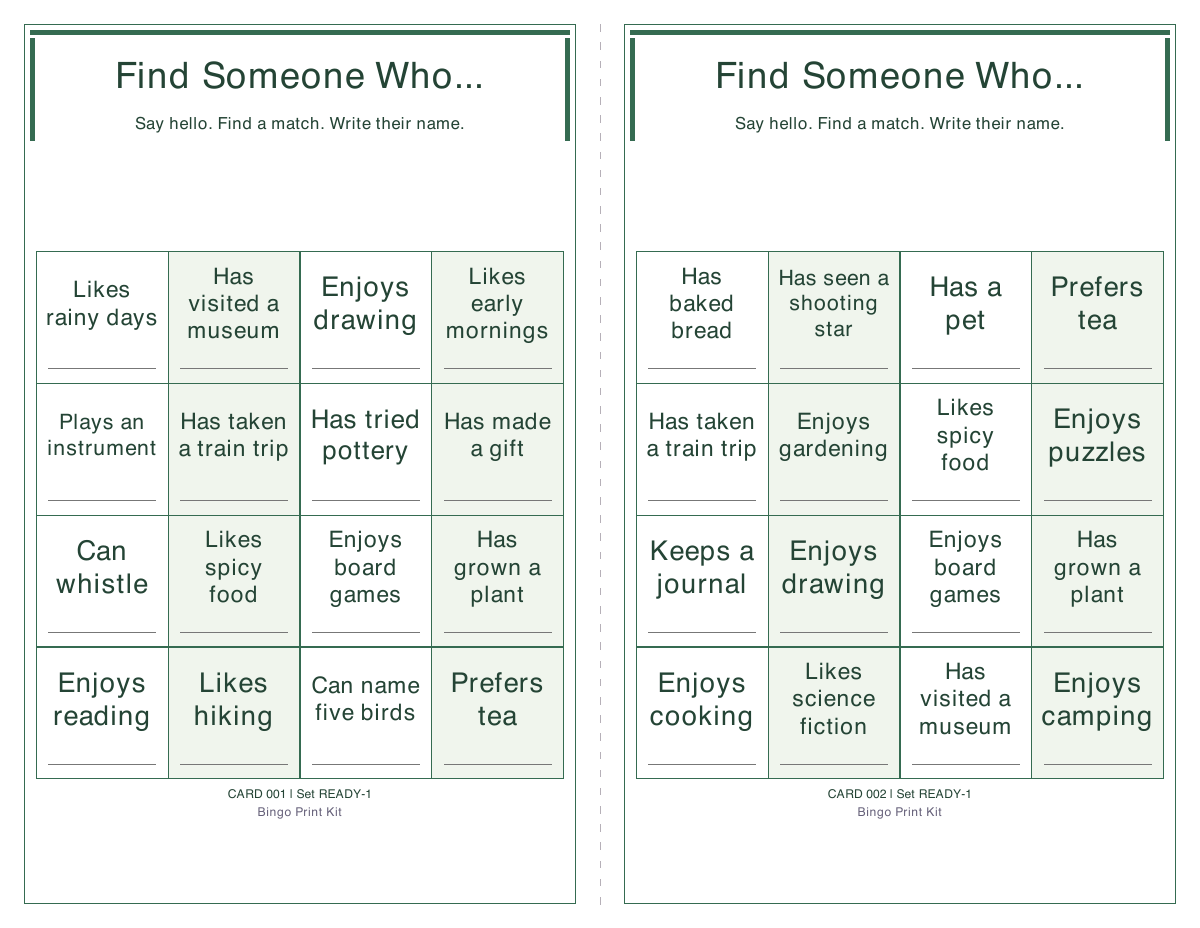
Generated example from the Botanical design, with the adult icebreaker starter and two cards per sheet. These are sample prompts, not participants’ personal information.
How do I print the same card again?
- Open your saved project file, or restore the draft on the same browser.
- Keep the word list, grid, free-centre setting and set code unchanged.
- For card 12, set Start at card to 12 and Number of cards to 1. Choose Player cards only and download.
- For the next batch after cards 1–30, start at 31. Changing paper, font or print design keeps the numbered card contents unchanged.
Each layout within a set is different, but different cards can still win at the same time. A set code alone is not a backup: keep the project file, which also holds the words, pictures and design.
Printing and download troubleshooting
The card is clipped or prints very small
Match Letter/A4 in the generator and printer. Start with Actual size / 100%, one PDF page per sheet, single-sided. Check the PDF itself before printing and use a test page. Printer margins and viewer settings can affect the result.
My picture is missing
A picture appears only when its label is in the word list and that entry is selected for the particular randomized card. If your pool is larger than one grid, not every entry appears on every card. The caller checklist includes all listed entries. After editing a picture label, press ✓ to apply it. Preview the actual pages before downloading.
I cannot restore a draft
Drafts belong to the browser and site where they were saved. Clearing site data, using another device or moving from the preview address to a new domain does not transfer them. Export a project file before moving, then import it at the new address. Storage can be unavailable or full, especially with pictures.
The download button is disabled
Read the error beside the editor. A grid needs at least eight entries for 3 × 3 with a free centre, sixteen for 4 × 4, or twenty-four for 5 × 5 with a free centre. Larger layouts and shorter phrases can fix text-fitting errors. Standard PDF fonts support English and common Western European accents; unsupported characters need replacing.
Make your printable bingo kit →
Still stuck? Contact support. Tell us the paper and layout settings without sending private card content.